Android Digital Signage Explained: Features, Benefits & How It Works
Digital signage has become an important communication tool for retailers, restaurants, hotels, offices and other businesses. Among the technologies available today, Android digital signage has become a flexible solution for companies looking for commercial displays that combine dedicated hardware, connectivity and software capabilities.
Unlike a simple monitor connected to an external media player, an Android-powered commercial display can integrate the operating system, processor, storage, connectivity and display hardware into one solution. This can simplify installation and provide businesses with more flexibility when deploying digital signage across different environments.
But how does Android digital signage work, and what should businesses consider before choosing an Android commercial display?
What Is Android Digital Signage?
Android digital signage is a commercial display solution that uses the Android operating system to run digital signage applications and display content.
Depending on the hardware configuration, an Android digital signage display can play:
-
Images
-
Videos
-
Promotional content
-
Digital menus
-
Product information
-
Web-based content
-
Presentations
-
Announcements
-
Interactive applications
-
Real-time information
The Android operating system provides a familiar and flexible software environment, while the commercial display hardware is designed for continuous professional use.
This combination makes Android digital signage suitable for a wide range of applications.
How Does Android Digital Signage Work?
A typical Android digital signage system combines several components:
1. Commercial Display
The LCD panel provides the visual output. Depending on the application, businesses can choose different screen sizes, resolutions, brightness levels, touch technologies and form factors.
2. Android System
An integrated Android system provides the processing environment required to run applications and display content.
Hardware specifications can include different processors, RAM, internal storage and Android versions depending on the product and project requirements.
3. Connectivity
Android digital signage displays can support different connectivity options, such as:
Connectivity allows the display to access content, networks, applications and external devices.
4. Digital Signage Software
The display can run compatible digital signage software or applications for content playback and management.
Depending on the system, businesses can manage content locally or connect displays to a centralized platform for remote management.
Why Choose Android for Digital Signage?
One of the biggest advantages of Android is its flexibility.
Android is already widely used across smartphones, tablets, smart displays and other connected devices. This creates a familiar software ecosystem and allows developers and system integrators to build applications for commercial display environments.
For businesses, Android can offer a balance between:
Flexibility + Connectivity + Customization + Ease of Integration
This is particularly useful for projects requiring more than simple video playback.
1. Flexible Software Environment
Android allows commercial displays to run compatible applications and services directly on the device.
Depending on the configuration, businesses can use applications for:
-
Digital signage
-
Advertising
-
Digital menus
-
Product catalogs
-
Information displays
-
Self-service
-
Interactive experiences
-
Internal communication
This means the same hardware platform can support different applications depending on the business requirement.
2. Remote Content Management
Modern digital signage networks often require centralized content management.
Instead of manually updating every screen, businesses can use compatible content management systems to distribute content remotely.
For example, a retailer operating multiple stores could manage promotional content across several locations from a centralized platform.
Content could include:
-
Promotional campaigns
-
Product information
-
Prices
-
Videos
-
Images
-
Announcements
-
Seasonal promotions
The exact capabilities depend on the selected CMS and Android hardware configuration.
3. WiFi and Network Connectivity
Connectivity is an important part of modern digital signage.
Android displays can be equipped with WiFi and other network interfaces, allowing them to communicate with cloud platforms, local networks and digital signage management systems.
This can make installation more flexible because businesses do not always need to connect every screen to a separate computer.
For applications requiring wired connectivity, Ethernet can also be available depending on the display configuration.
4. Interactive Android Digital Signage
Android becomes particularly interesting when combined with touchscreen technology.
An interactive Android display can allow customers or employees to interact directly with digital content.
Possible applications include:
-
Product catalogs
-
Self-service kiosks
-
Interactive menus
-
Product comparison
-
Wayfinding
-
Information terminals
-
Customer registration
-
Retail experiences
For these applications, you can explore BlueShell's [Interactive Digital Signage] solutions for commercial touchscreen applications.
5. Android Digital Signage for Retail
Retail is one of the most common applications for commercial digital displays.
Retailers can use Android displays for:
A display can also be integrated into different areas of a store, from entrance advertising to product displays and checkout communication.
For projects requiring compact displays or interactive customer-facing solutions, BlueShell also offers [Desktop Digital Signage] and [Interactive Kiosks & Totems].
6. Android Digital Signage for Restaurants
Restaurants are increasingly replacing printed menus and static promotional materials with digital displays.
Android commercial displays can be used for:
-
Digital menu boards
-
Promotional videos
-
Special offers
-
Product images
-
Self-service ordering
-
Customer communication
Digital content can be changed without physically replacing printed menus.
For interactive applications, touchscreen Android displays can also support ordering and self-service experiences depending on the software and system configuration.
7. Android Digital Signage for Hotels and Hospitality
Hotels and hospitality businesses can use digital signage to communicate information to guests.
Examples include:
-
Welcome screens
-
Hotel services
-
Restaurant information
-
Event schedules
-
Promotional content
-
Directions
-
Facility information
Displays can be installed in reception areas, corridors, restaurants, meeting spaces and other guest-facing locations.
8. Android Digital Signage for Corporate Offices
Android displays are also suitable for professional office environments.
Applications include:
-
Meeting room signage
-
Room booking
-
Company announcements
-
Visitor information
-
Internal communication
-
Event schedules
For businesses looking for dedicated corporate displays, BlueShell provides [Meeting Room Signage] solutions designed for professional environments.
Android Digital Signage vs Traditional Displays
A traditional display may simply receive a video signal from an external computer or media player.
An Android commercial display can integrate many of the components required for digital signage into the display itself.
Traditional Display Setup
Display → External Computer / Media Player → Content
Android Digital Signage Setup
Android Display → Application / CMS → Content
The second configuration can reduce the number of external devices required and simplify certain installations.
However, the best architecture depends on the project. Some professional installations may still benefit from external media players or specialized computing platforms.
Android Digital Signage vs Windows
Android and Windows can both be used for commercial digital signage, but they serve different requirements.
Android
Often attractive for:
-
Dedicated signage applications
-
Interactive displays
-
Embedded solutions
-
Lower hardware complexity
-
Smart commercial displays
-
Custom Android applications
Windows
Often attractive for:
-
Full desktop applications
-
Complex enterprise software
-
Specialized PC-based systems
-
Applications requiring Windows-specific software
There is no universally better operating system.
The right choice depends on the software, hardware, application and management requirements of the project.
What Hardware Specifications Matter?
When choosing an Android digital signage display, businesses should consider more than screen size.
Processor
The processor affects application performance and multimedia playback.
RAM
More demanding applications may require additional memory.
Storage
Internal storage determines how much local content and software can be stored on the device.
Display Resolution
Higher-resolution displays can provide sharper images and text, particularly when viewers are close to the screen.
Brightness
Brightness should be selected according to the installation environment.
Indoor retail applications may require different brightness levels from displays installed in bright public environments.
Touchscreen
Interactive applications may require touchscreen functionality.
Connectivity
WiFi, Ethernet, Bluetooth, USB and other interfaces can be important depending on the project.
Operating System Version
Businesses should consider Android version compatibility with the applications and CMS they plan to use.
Android Digital Signage and Remote Device Management
For large digital signage networks, managing the content is only part of the challenge.
Businesses may also need to monitor:
-
Device status
-
Connectivity
-
Software
-
Content playback
-
Screen schedules
-
System updates
Remote device management can reduce the need for physical maintenance, particularly when displays are installed across multiple stores or locations.
The exact capabilities depend on the selected CMS, software platform and hardware.
Android Digital Signage for Different Display Formats
Android technology can be integrated into many different commercial display formats.
Wall-Mounted Displays
Suitable for retail, hospitality, corporate and public environments.
Explore [Wall Mount Digital Signage].
Ultra-Wide Displays
Useful where a wide aspect ratio is required for advertising or information.
Explore [Ultra-Wide Stretch Digital Signage].
Interactive Displays
Designed for touch interaction, self-service and customer engagement.
Explore [Interactive Digital Signage].
Meeting Room Displays
Designed for corporate communication and room management.
Explore [Meeting Room Signage].
Kiosks and Totems
Suitable for self-service, advertising and information applications.
Explore [Interactive Kiosks & Totems].
This flexibility is one of the reasons Android is increasingly used across different commercial display projects.
Android Digital Signage for OEM & ODM Projects
Businesses that require a standard display can choose an existing commercial product.
However, larger projects may require customized hardware or software.
OEM and ODM projects can include:
BlueShell provides [OEM & ODM Digital Signage] solutions for distributors, system integrators, retailers and technology brands.
A customized solution can be developed around the requirements of the application rather than forcing the project to adapt to an existing product.
How to Choose the Right Android Digital Signage Display
Before selecting an Android commercial display, consider these questions:
Where will the display be installed?
Indoor retail, restaurants, offices, public spaces and other environments may require different specifications.
How far away will viewers be?
Viewing distance helps determine the appropriate screen size and resolution.
Is interaction required?
If customers need to touch the screen, choose an appropriate touchscreen configuration.
Does the display need WiFi?
For cloud-based content management, remote access or connected applications, network connectivity may be essential.
What software will run on the display?
Always confirm compatibility between the Android version, hardware and intended application.
Is customization required?
For larger projects, consider OEM or ODM manufacturing instead of adapting a standard product.
How many displays will be deployed?
A single display and a network of hundreds of screens may require very different management strategies.
The Future of Android Digital Signage
Digital signage is evolving from simple content playback toward connected and intelligent commercial display systems.
Future applications are increasingly combining:
-
Android
-
Artificial intelligence
-
IoT
-
Sensors
-
Cloud platforms
-
Remote management
-
Interactive displays
-
Data-driven content
This creates opportunities for businesses to build more intelligent customer experiences.
For example, digital displays can potentially be integrated with sensors, inventory systems, retail platforms or other connected technologies to provide more contextual information.
Why Choose a Shenzhen Android Digital Signage Manufacturer?
Shenzhen is one of the world's leading electronics and technology manufacturing hubs.
Working with a Shenzhen-based manufacturer can provide access to an established electronics supply chain, engineering resources, component suppliers and manufacturing expertise.
For international businesses, a direct manufacturing relationship can also provide more opportunities for product customization and OEM or ODM development.
BlueShell, the global brand of Shenzhen Link Technology Co., Ltd., has been developing and manufacturing commercial displays and smart LCD solutions since 2012.
Our capabilities cover product development, customization, manufacturing and global business support.
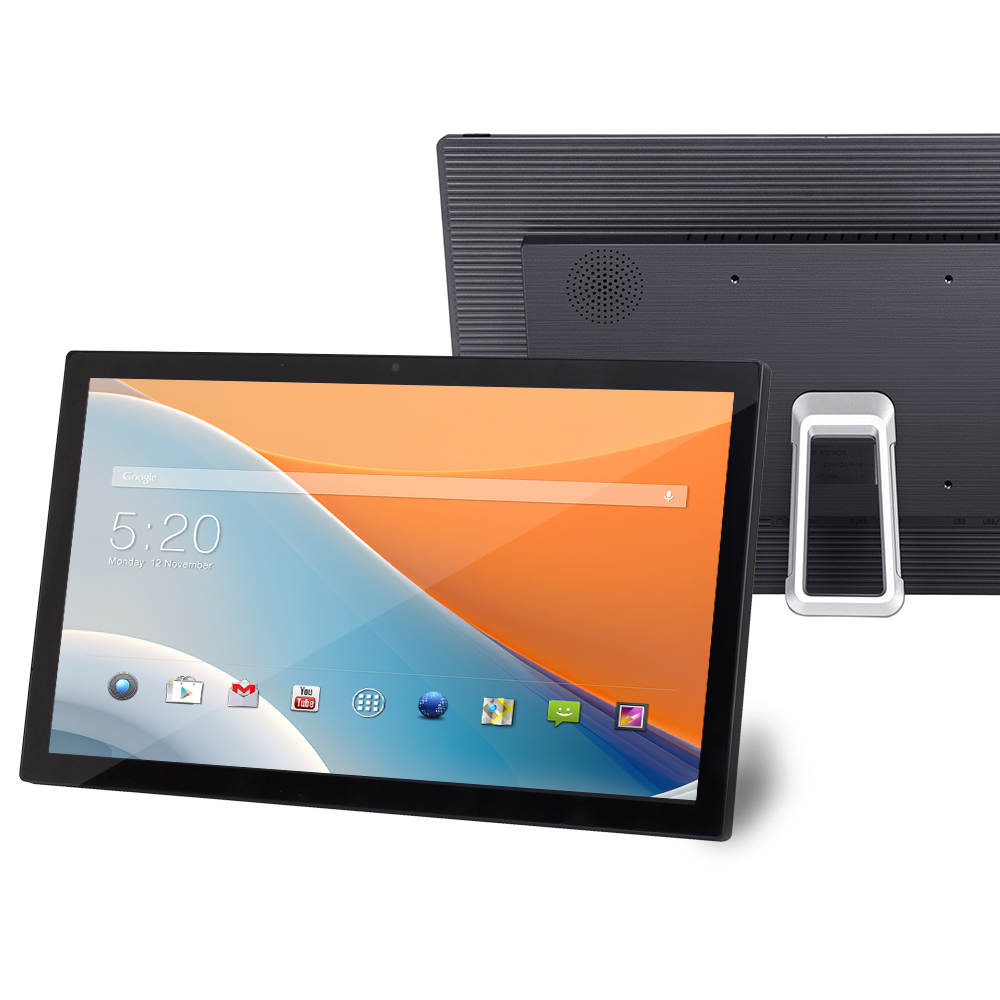
Android Digital Signage: More Than Just a Screen
An Android digital signage display is more than an LCD panel.
It combines display technology, computing hardware, connectivity and software into a platform that can support advertising, communication, interaction and smart commercial applications.
For businesses looking for flexible digital signage solutions, Android can provide a practical foundation for everything from simple promotional screens to interactive and connected commercial display networks.
The right solution depends on the application, environment, content strategy and technical requirements.
Explore BlueShell Android Digital Signage Solutions
BlueShell provides commercial display solutions for retailers, restaurants, hospitality businesses, corporate customers, system integrators and technology brands.
Explore our [Digital Signage Products], discover our [Interactive Digital Signage], [Wall Mount Digital Signage], [Meeting Room Signage] and [Interactive Kiosks & Totems], or contact our team to discuss a customized [OEM & ODM Digital Signage] project.
Looking for a customized Android commercial display?
Contact BlueShell to discuss your display size, operating system, touchscreen, connectivity, branding and other project requirements.
BlueShell — Digital Signage Manufacturer in Shenzhen, China | OEM & ODM Commercial Display Solutions


